
Run your social media with Claude Cowork.
Cowork uses the JuzPost connector from your Claude account. Hand it a bigger job, like a week of posts from your notes, and approve each step as it works.








Start in 3 steps
If JuzPost is already connected in Claude, skip step 1. No terminal, no API key.
Turn JuzPost on in Cowork
- 1Add JuzPost from the Claude connector directory and approve it in JuzPost.
- 2In the Desktop app, pick Cowork in the Chat | Cowork switch.
- 3Click + → Connectors, switch JuzPost on, then describe the job.
https://claude.ai/directory/juzpost
list_accounts4 accountscreate_postdraft 1 of 3create_postdrafts 2, 3One connector, every channel you run from Cowork
Connect your accounts in JuzPost once. From then on Cowork can post to any of them, and JuzPost publishes at the time you set, even after you close the app.

How Cowork asks before it posts
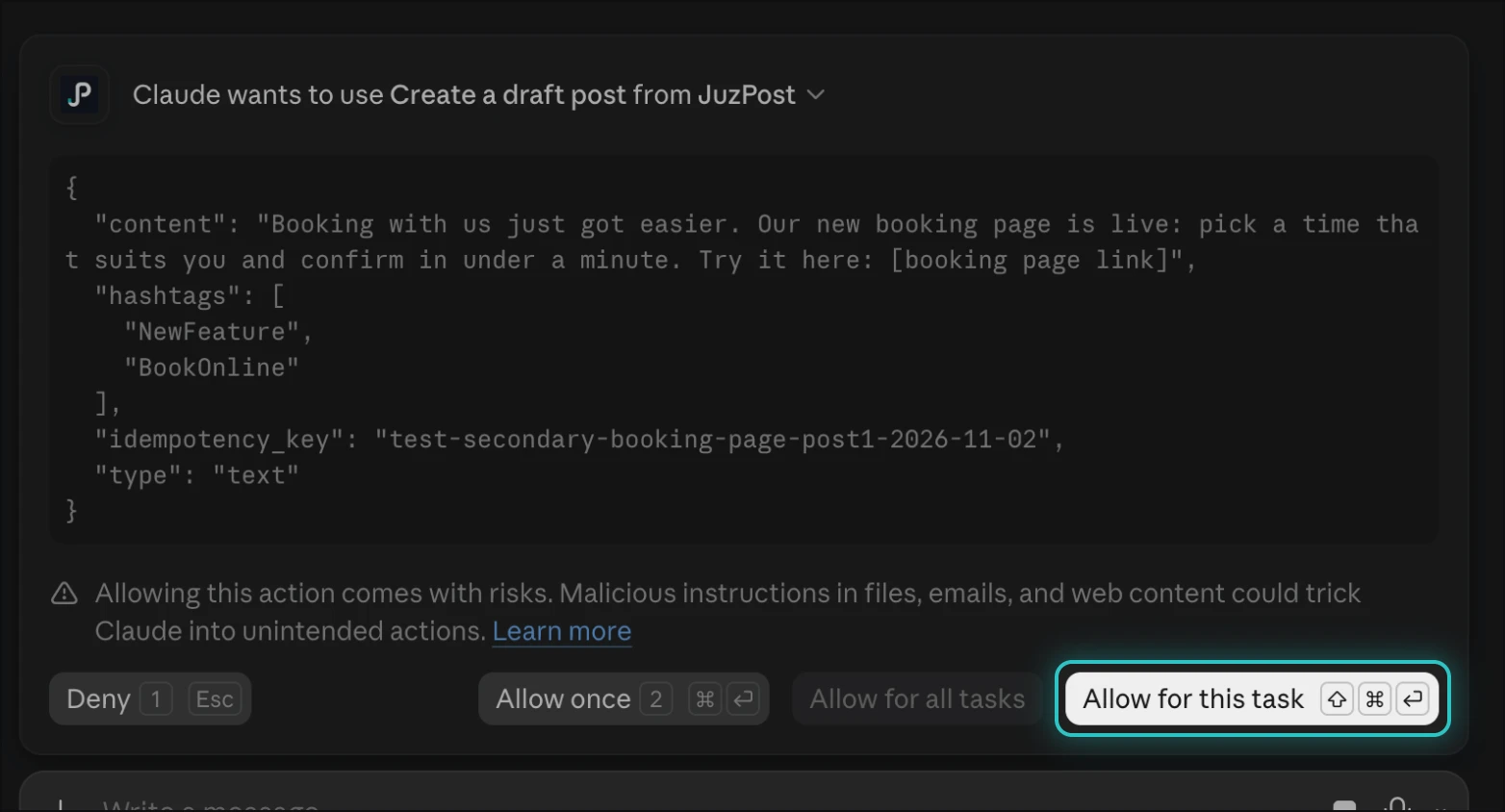
Cowork stops at each JuzPost tool and shows you what it will do. Reading is quick to allow; anything that writes asks every time unless you allow more.
| What you can pick | Good for | |
|---|---|---|
| Reading (accounts, queue) | Allow once · Always allow | Let it look up accounts and posts without stopping |
| Writing (drafts, schedule, edits) | Allow once · Allow for this task | Approve a whole batch of drafts in one go |
| Allow for all tasks | Greyed out on Team and Enterprise until the owner turns it on | Owners who want fewer prompts |
Approve the JuzPost step in the task
Cowork shows the tool name and the request. Pick Allow for this task to let it finish the batch.
What Cowork can do with JuzPost
Real JuzPost tools, chained into one job. Cowork plans the steps and checks in with you.
create_postA week of drafts in one ask
Give it a theme or a notes file. It writes one draft per day, per network, for you to review.
upload_mediaMedia from your folders
Share a folder of images or clips and it attaches the right file to each post.
schedule_postSchedule the batch
Once you like the drafts, ask it to schedule them. Scheduling always asks first.
list_postsReview the queue
Ask what goes out this week, what is still a draft and what failed.
SkillsKnows how to post
With the JuzPost plugin added, Cowork loads the social-media-scheduler skill on its own.
Other connectorsWorks with your other apps
Pull a brief from Drive or Notion and post it with JuzPost in the same task.
What is Claude Cowork?
Anthropic's agent for bigger jobs, inside the Claude Desktop app. It plans multi-step work, reads the folders you share and uses your connectors. With JuzPost on, one of those jobs is your social media.
| Claude Cowork | Claude chat | Claude Code | |
|---|---|---|---|
| Where it runs | Claude Desktop app, Cowork tab | claude.ai, Desktop, mobile | Terminal and editors |
| Best for | A batch of posts, a week of content | One post, quick questions | Posts from your codebase |
| How JuzPost connects | The connector from your Claude account | Claude directory or custom address | claude mcp add or the plugin |
| Reads local files | Yes, folders you share | Uploads only | Yes, your project |
| Claude Free | No: shows Upgrade | Yes | No |
How JuzPost works with Cowork
Cowork uses the same JuzPost connector as Claude chat. Turn it on for a task and Cowork calls the tools step by step.
One task, many steps
- 1Finds your accountsIt lists the accounts in your JuzPost workspace.
- 2Reads your materialNotes, folders or other connectors you point it at.
- 3Writes for each networkRight length, hashtags and format for every account.
- 4Saves drafts, then schedulesYou approve the writes along the way.
What can I ask Cowork to do?
Bigger jobs than a single post. Describe the outcome and Cowork works through it.
Plan a whole week
Post a photo set
Turn a blog post into posts
Review and fix
Which platforms can Cowork post to?
Every network JuzPost supports. Connect your accounts in JuzPost once, then hand Cowork the job.
Want each network's rules, sizes and best times? Every platform has its own scheduler page.
Claude, Claude Code or Cowork?
Three Anthropic products, one JuzPost account. This page is for Cowork.
Claude
→Chat at claude.ai, on Desktop and on mobile. Add the connector and ask.

Claude Code
→Terminal and editors. One install command.
Claude Cowork
This pageHand over a bigger job, like a week of posts.
Fewer prompts for your team
By default, Cowork asks before every JuzPost write. Owners can turn on Allow "Always allow" for connector tools in Organization settings → Capabilities.

Pricing, security and troubleshooting
How much does it cost?
Cowork needs a Claude Pro, Max, Ultra, Team or Enterprise plan. Posting needs a JuzPost Solo, Growth or Pro plan, and every network is on every paid plan. Try any plan for $0.
Compare JuzPost plansHow is access secured?
Cowork uses the connector you approved in JuzPost: one workspace, the permissions you picked. No password or API key goes into the task. Revoke from Claude's connector page or JuzPost Dashboard → AI agents.
Something not working?
Common questions
Does Cowork work on Claude Free?
No. On Free, the Cowork switch shows Upgrade. Use Claude chat with the JuzPost connector instead.
Do I add JuzPost again for Cowork?
No. Cowork uses the connector from your Claude account. Switch it on in the task with + → Connectors.
Why does it ask before every draft?
Writes need your approval. Pick Allow for this task to approve the whole batch at once.
Can it post without asking?
Only if your owner turned on Always allow for connector tools. Scheduling a post always asks.
Do posts go out if I close the app?
Yes. Once scheduled, JuzPost publishes them on time.
Do I need the JuzPost plugin?
No. The connector is enough. The plugin adds a ready-made skill Cowork loads on its own.
Does it need a terminal or API key?
No. Everything happens in the Claude Desktop app.
How do I turn it off?
Switch JuzPost off in the task, or disconnect it in Claude. In JuzPost, Dashboard → AI agents → revoke.
Hand your social media to Cowork
Connect JuzPost once, then give Cowork the whole week. You approve, JuzPost publishes.