
Post to social media from Claude.
Add JuzPost from Claude's connector directory, then ask Claude to draft, schedule and check posts on every account you connect. Works on the web, Desktop and mobile.








Connect in 3 steps
Connect, approve, ask. Under a minute, no install and no API key.
One click from the Claude directory
- 1Open JuzPost in the Claude connector directory and click Connect to Claude.
- 2JuzPost opens. Pick your workspace and click Approve.
- 3In a chat, click + → Connectors, switch JuzPost on and ask.
https://claude.ai/directory/juzpost
create_post2 accountsschedule_posttomorrow 9:00One connector, every channel you run
Connect your accounts in JuzPost once. From then on Claude can post to any of them, and JuzPost publishes at the time you set.

Directory or custom address?
Both reach the same JuzPost account with the same tools. The directory is one click.
| Claude directory | Custom address | |
|---|---|---|
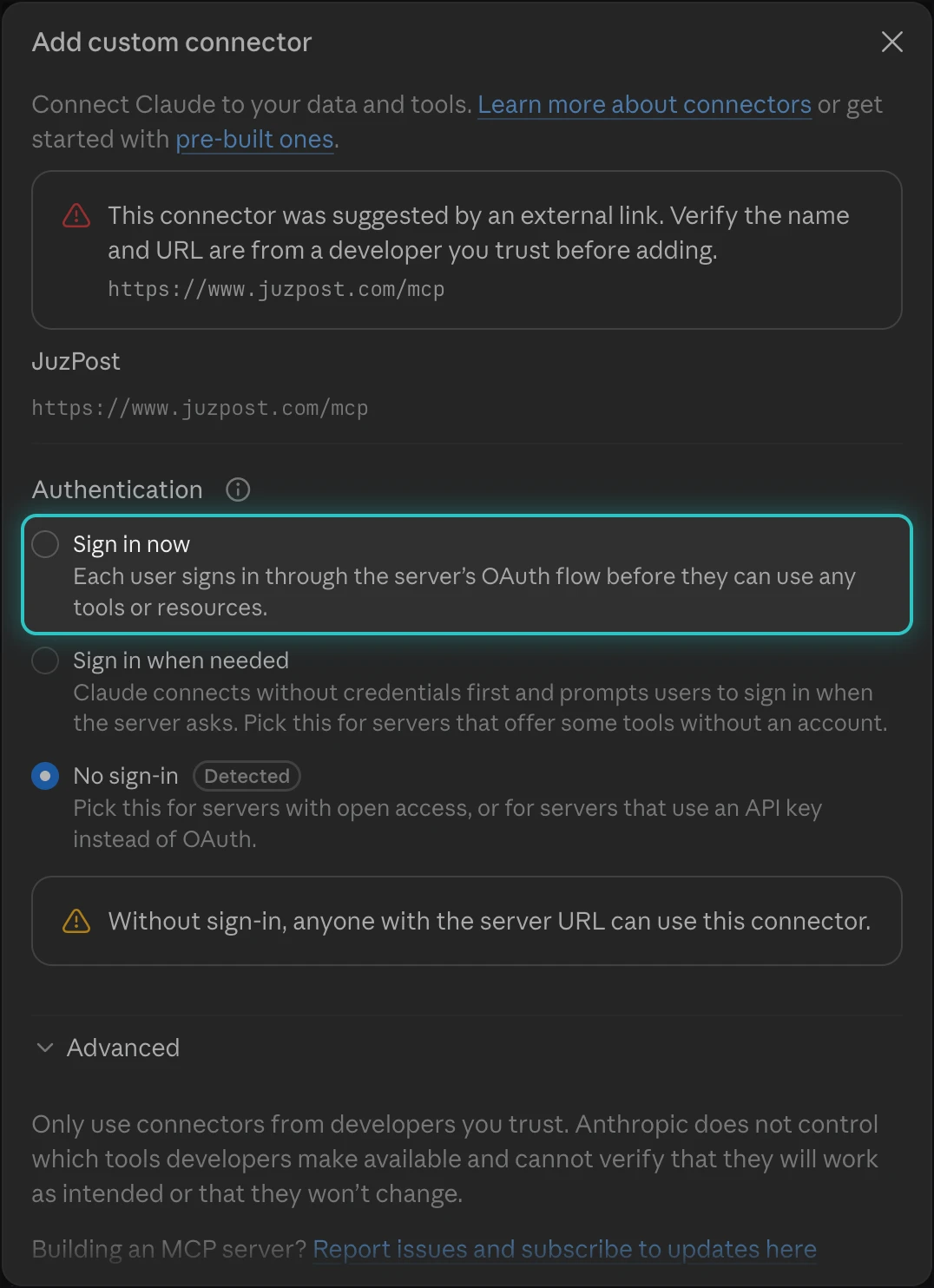
| Where | Customize → Connectors → Discover | Customize → Connectors → + Add → Add custom connector |
| Setup | One click | Paste https://www.juzpost.com/mcp, pick Sign in now |
| Claude Free | Works, keeps your 1 custom slot free | Uses your 1 custom connector |
| Team, Enterprise | Owner adds it for everyone; members can Request | Owner only |
| Tools | Every JuzPost tool | Every JuzPost tool |
Pick Sign in now, not the detected option
Claude pre-selects No sign-in (Detected). Change it to Sign in now and keep Use Claude's published identity, or JuzPost tools won't work.
What Claude can do with JuzPost
Real JuzPost tools, called from the chat. Claude shows you each one before it runs.
create_postPost to every channel
One request becomes posts for each connected account, with per-platform text when you want it.
schedule_postSchedule and queue
Pick a time or let Claude pick one. Scheduling always asks you first.
upload_mediaImages and video
Attach media in the chat or by link. JuzPost checks it against each platform.
list_postsKnow what is coming up
Ask what goes out this week, what is still a draft and what failed.
list_workspacesWorkspaces and groups
Switch between brands or clients and post to a saved group in one go.
Tool permissionsYou stay in control
Allow once, Always allow or Block per tool in Claude. Revoke from JuzPost any time.
What is the JuzPost MCP?
A Model Context Protocol server that gives Claude your JuzPost tools. MCP is the standard way AI assistants plug into the apps you use, so Claude can post, schedule and check your queue without you opening a dashboard.
How Claude uses JuzPost
Once the connector is added, Claude finds the JuzPost tools on its own and calls them when you ask it to post.
- Add the connectorFrom the Claude directory in one click, or by address.
- Claude finds your accountsIt reads your connected accounts and each network's rules.
- It writes for each networkRight length, hashtags and format for every account.
- It drafts, schedules or postsExactly as you asked, after you approve.
- Works with your other toolsPull a brief from Drive or Notion, post it with JuzPost.
Read more in the JuzPost API docs.
What can I ask Claude to post?
Anything you would ask a teammate. No commands: name the channels, the timing and the tone, and Claude handles the rest through JuzPost.
Ship a launch post
Plan a whole week
One video, three networks
Check what goes out
Which platforms can Claude post to?
Every network JuzPost supports. Connect your accounts in JuzPost once, then post to any of them just by asking Claude.
Want each network's rules, sizes and best times? Every platform has its own scheduler page.
Claude, Claude Code or Cowork?
Three Anthropic products, one JuzPost account. This page is for the Claude chat app.
Claude
This pageChat at claude.ai, on Desktop and on mobile. Add the connector and ask.

Claude Code
→Terminal and editors. One install command.
Claude Cowork
→Hand over a bigger job, like a week of posts.
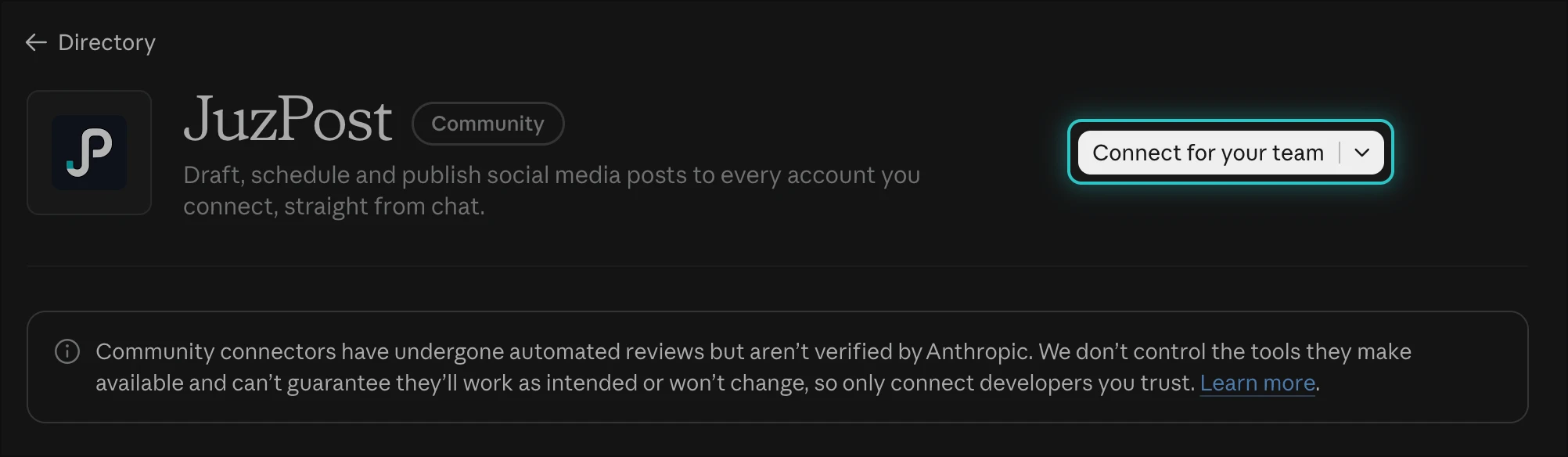
Your owner adds it once for everyone
Owners click Connect for your team on the listing. Members then click Connect under Customize → Connectors → Yours, or Request if it isn't there yet.
Pricing, security and troubleshooting
How much does it cost?
The Claude connector has no separate charge and works on Claude Free. Posting through Claude needs a JuzPost Solo, Growth or Pro plan, and every network is on every paid plan. Try any plan for $0.
Compare JuzPost plansHow is access secured?
Claude connects through OAuth: you sign in on JuzPost, pick one workspace and the permissions Claude gets. No password or API key goes into the chat. Revoke it any time from Claude's connector page or JuzPost Dashboard → AI agents.
Something not working?
Common questions
Does it work on Claude Free?
Yes. The directory connector works on every Claude plan. Posting needs a JuzPost Solo, Growth or Pro plan.
Does Claude post without asking?
No. Claude asks before each JuzPost tool unless you chose Always allow. Scheduling always asks.
I see Request instead of Connect
You are on Team or Enterprise and your owner has not added JuzPost yet. Click Request.
"Already exists in your organization"
JuzPost is already added. Go to Customize → Connectors → Yours → JuzPost → Connect.
Claude does not use JuzPost
In the chat, click + → Connectors and switch JuzPost on.
What does Community mean?
Anthropic ran automated reviews on the connector but does not verify it.
Does it work on my phone?
Yes. Connect on the web or Desktop first, then use + → Connectors in the app.
How do I turn it off?
In Claude, open the JuzPost connector and click Disconnect. In JuzPost, Dashboard → AI agents → revoke.
Let Claude run your social media
Connect JuzPost to Claude and start posting everywhere, just by asking.