
Best Time to Post on Instagram in 2026: 5 Studies Compared

The five big 2026 studies agree on one thing: weekday afternoons and evenings in your audience’s local time, Tuesday through Thursday. The only slot three of the five name is Tuesday between 3 and 9 pm. Nothing gets four votes, so treat that as a starting point and check it against Most active times in your own Instagram Insights.
Here is every study’s answer, day by day, as each vendor published it. All times are the audience’s local time.
| Day | Sprout Social | Hootsuite | Later | Buffer | HubSpot (survey) |
|---|---|---|---|---|---|
| Monday | 2-4 pm | 3-9 pm | 5 am, 11 pm | 6-8 pm | 9 am-12 pm |
| Tuesday | 1-7 pm | 5-8 am, 3-7 pm | 5 am | 3 pm, 5 pm, 7 pm | 9 am-12 pm |
| Wednesday | 12-9 pm | 5 pm | 3 am | 8 am, 12 pm, 6 pm | 9 am-12 pm |
| Thursday | 12-2 pm | 4-5 pm | 4-5 am | 7-9 am | 3-6 pm |
| Friday | no peak | 4 pm | 3-6 am | 6 am, 9-10 pm | 12-3 pm |
| Saturday | lowest day | 11 am, 5 pm | 5 am | 8-10 pm | 12-3 pm |
| Sunday | worst day | 12-3 pm | 12 am, 5 am, 11 pm | 8-10 pm | 6-9 pm |
| Best day | Tue, Wed | Mon, Tue, Thu | Mon | Wed | Fri |
| Basis | ~2B engagements | 1M+ posts | 6M+ posts | 9.6M posts | 601 marketers |
JuzPost does not have a posting dataset of its own, and this post does not pretend to. Every time above is the vendor’s published figure, read on 23 November 2026 from Sprout Social (March 2026), Hootsuite (July 2026), Later (April 2026), Buffer (September 2026) and HubSpot (August 2026). What JuzPost does have is the Instagram publishing API in production, which is section 8.
Once you have picked a time, the post still has to go out on it. The caption is the other thing to get right first:
Check your caption length1. Schedule your posts for those times with JuzPost
JuzPost publishes Instagram posts, carousels, Reels and Stories at the minute you pick, so you can post at 5 pm without being on your phone at 5 pm.
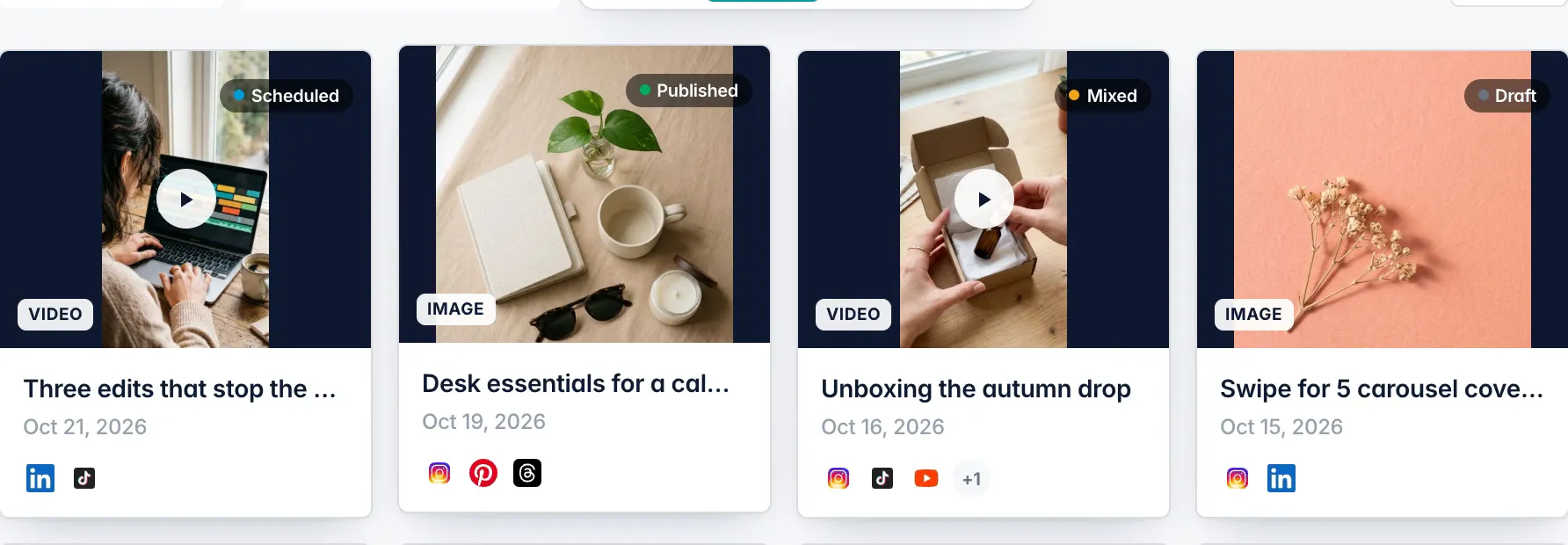
- Sign up for JuzPost free and connect your Instagram professional account (Business or Creator).
- Click Create post, add your photo, carousel or Reel, and write the caption.
- Pick the time from the table above, in your audience’s time zone.
- Click Schedule. JuzPost prepares the post with Instagram 10 minutes early, so it goes live on the minute.
To test two candidate slots for four weeks (section 7 shows how), schedule them once and the posts go out on time every week while you compare.
Schedule Instagram posts with JuzPost2. What each study measured
They measured different things, so their answers differ. Before comparing times, compare what sits behind each one.
Sprout Social: 2 billion engagements, three winter months
Monday to Thursday, midday into early evening. Weekends are the weakest.
Sprout looked at nearly 2 billion engagements across about 307,000 profiles belonging to its customers, from 27 November 2025 to 27 February 2026. That is the freshest data of the five and the narrowest window, one holiday season plus winter. Wednesday has the widest window, noon to 9 pm, with a spike at 11 pm. Friday has no significant peak at all.
Hootsuite: 1 million posts across 118 countries
Late afternoon, every day of the week. Monday 3-9 pm, Wednesday 5 pm, Thursday 4-5 pm, Friday around 4 pm.
Hootsuite analysed over 1 million posts with the research firm Critical Truth, localised across 118 countries. The page does not say which months the data covers. It also breaks results down for ten industries.
Later: 6 million posts, and the outlier
Before dawn. Later’s best times sit between midnight and 6 am on every day of the week, with Monday as the best day.
The sample is the largest by post count, over 6 million feed posts from January to October 2024, plus a separate set of 975,000 Reels. Later says its data is normalised to your audience’s local time zone, so 5 am means 5 am where your followers are. The page contradicts itself once: Friday is “3 AM to 6 AM” in the day section and “3 AM to 5 AM” in the summary.
Buffer: 9.6 million posts over two years
Wednesday and Thursday. The top three slots are Thursday 9 am, Wednesday noon and Wednesday 6 pm.
Buffer pulled 9.6 million Instagram posts from January 2024 to December 2025 and ranked hours by median engagement rate, which divides likes, comments, shares and saves by follower count. Weekends come out best late in the evening, 8 to 10 pm, while Friday and Saturday are the weakest days overall.
HubSpot: a survey, not a measurement
Weekday mornings, 9 am to noon, with Friday as the best day.
HubSpot surveyed 601 marketers in the US, UK, India and New Zealand. Its numbers are the share of respondents who picked a slot as their peak, so they record what marketers believe works, not engagement anyone measured on posts. That is the main reason it disagrees with the others, and the reason it gets the least weight in the chart below.
3. Where the studies agree
Tuesday from 3 to 9 pm is the only slot three of five studies name. Monday late afternoon, Wednesday from noon to 9 pm and Thursday 3-6 pm each get two.
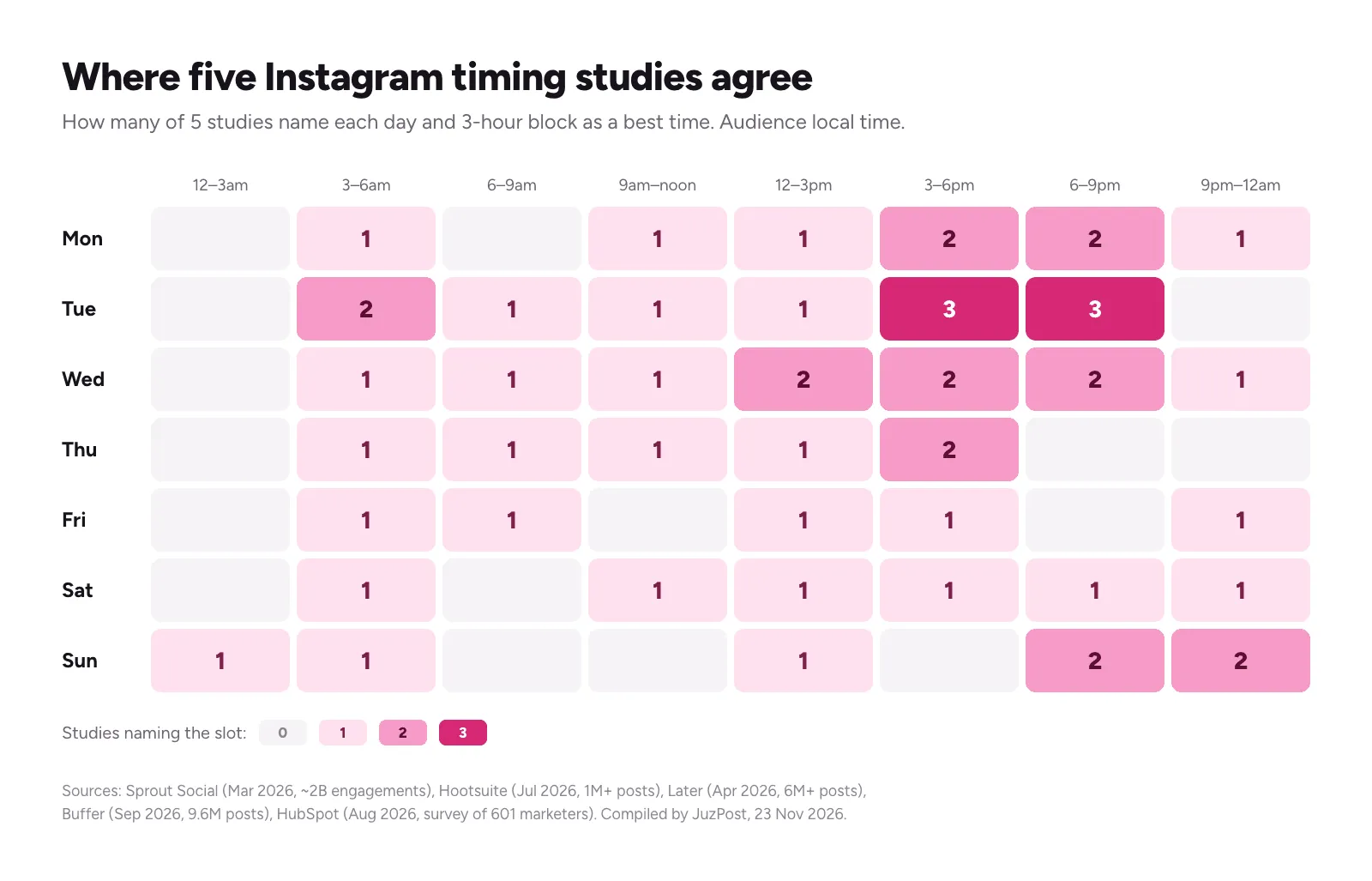
How the chart is built: each study’s named times are placed into 3-hour blocks, and a range that crosses a block boundary counts in both. A cell’s number is how many of the five studies name it. The method is mine; the inputs are theirs.
Three patterns survive the disagreement:
- Midweek beats the weekend. Four of the five rank a Monday to Thursday day as best. Sprout and Buffer both put Saturday at or near the bottom.
- Afternoon and early evening beat early morning, Later excepted. From Monday to Thursday, the highest count on each day falls somewhere between noon and 9 pm.
- Friday is weak. Sprout finds no peak, Buffer ranks it among the weakest days, and only the HubSpot survey calls it the best.
4. Where they contradict, and why
Later says 5 am. Buffer and Sprout say late afternoon. Both can be true, because they are answering different questions.
They measure different things
Later averages engagement per post. Buffer takes the median engagement rate per follower. Sprout counts engagements. HubSpot asks people. One plausible reading of Later’s result: a 5 am post has few viewers in its first hour, but it is fresh when people open the app before work, with fewer new posts competing for the top of the feed. Averaged over a whole day, that can win. A median per-follower rate, or a count of engagements by hour, can rank the same posts differently.
They sample different accounts and years
Each vendor studies its own customers, and each tool attracts a different mix of brands, creators and small businesses. Later’s data is from 2024, Buffer’s runs to the end of 2025, Sprout’s covers last winter. Instagram changed its ranking more than once in that span.
”Local time” is doing a lot of work
All five say their times are in the audience’s local time zone. That makes the numbers usable anywhere, and it also means a study converted millions of posts from many zones into one clock. If your followers are split between New York and London, no single local time applies to all of them, and a study’s 4 pm becomes two different instants for your audience.
5. Best time to post Reels
No study has a convincing Reels-specific answer. Use the same windows as feed posts.
- Later is the only one with separate Reels data, 975,000 Reels, and puts the best time at midnight, with Monday as the best day.
- Buffer suggests evenings, 6 to 11 pm, for Reels, but says on the same page that it analysed all post types together. The suggestion is not drawn from Reels data.
- Sprout says Reels follow the same windows as other formats, because the algorithm weights user activity times over format.
- Hootsuite and HubSpot give no Reels times.
The likely reason the timing matters less for Reels: a Reel’s distribution is driven largely by people who do not follow you, through the Reels tab and Explore, and that audience spans every time zone. A feed post leans harder on your followers seeing it in the hours after it goes up.
6. What Instagram itself says about timing
Instagram counts posting time as one ranking signal among many. It does not publish a best time.
The most direct statement is Adam Mosseri’s “Instagram Ranking Explained”, published on 31 May 2023. For Feed, the signals include information about the post, which covers “when it was posted”, and how popular it is, measured by “how quickly people are liking, commenting, sharing and saving a post”. The Stories section lists no timing signal at all, and the Reels section is about what the viewer has engaged with recently.
So timing reaches ranking two ways: recency, and how fast engagement arrives after you post. Both reward posting when your own followers are scrolling, and that is a fact about your account that no vendor average can supply.
A line attributed to Mosseri, that post timing “doesn’t matter much”, circulates on several ranking pages. I could not find it in a primary source with a date, so it is not quoted here.
7. Find your own best time in Instagram Insights
Your Most active times chart beats any study, once you have 100 followers. Meta’s help page lists “Times they’re most active on Instagram” under Total followers, available “when you have at least 100 followers”.
Insights are free on any public account. Instagram’s help center says a public personal account can view them too, not only Business and Creator accounts. Scheduling through a tool is different: the publishing API only works with a professional account.
Step 1: Open your follower insights
In the app, go to your profile, open the professional dashboard (or Your dashboard on a personal account), then Insights, and choose Total followers. Scroll to Most active times. On instagram.com, Insights sits under Dashboard in the left-hand menu. Menu names move between app versions, so look for the Total followers card if the labels differ.
Step 2: Pick two candidate slots
Take the busiest hour on your strongest day from Most active times, and one slot from the heatmap above where the studies agree, such as Tuesday at 5 pm. Post a little before the peak rather than at it, so the post is already in the feed when your followers arrive.
Step 3: Run it for four weeks
Alternate the two slots for the same format. Compare Views and Interactions per post, Reels against Reels and carousels against carousels, because a Reel reaching non-followers will swamp any timing effect on a photo.
Step 4: Wait before you judge
Meta’s Graph API documentation warns that insight numbers can lag by up to 48 hours. Read each post’s numbers after two days, not the same evening.
If your followers live in another time zone, convert the slots before you schedule them.
8. Scheduling at that time: what the API can and cannot do
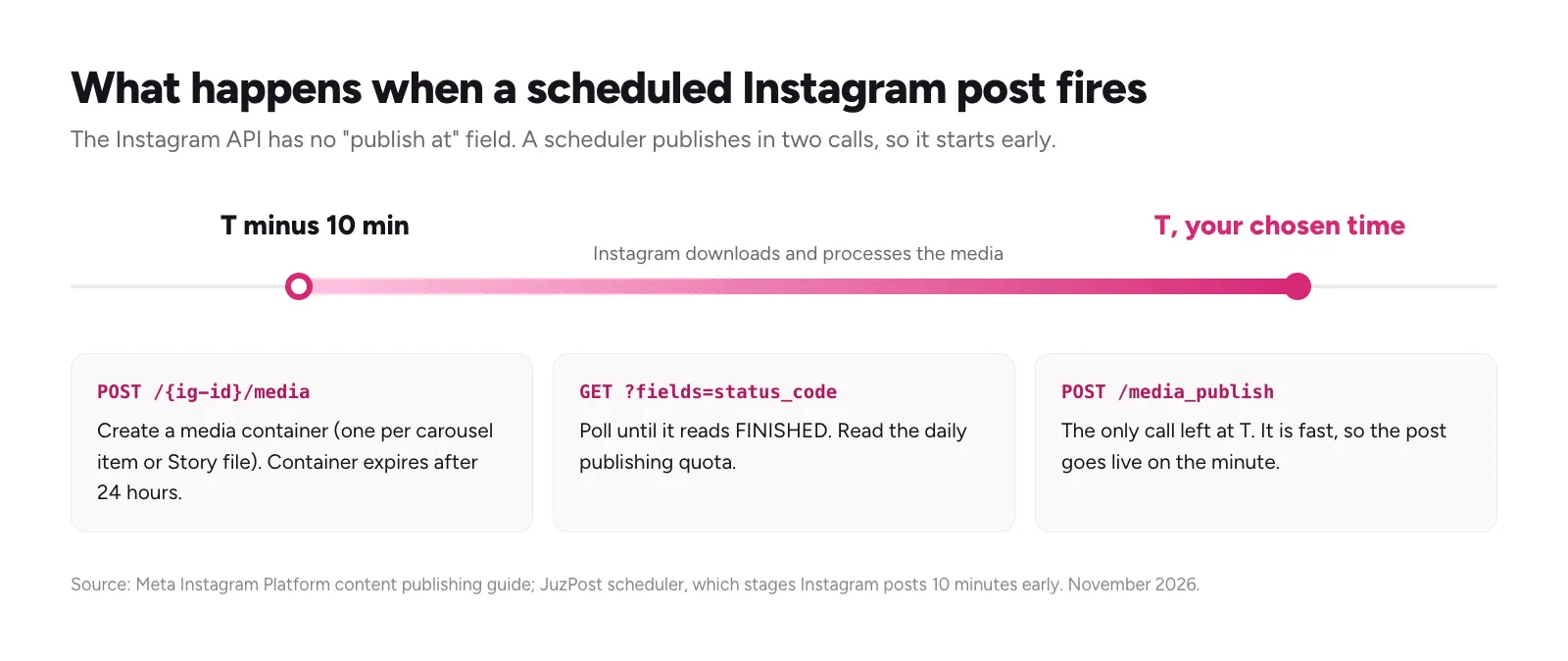
Instagram’s API has no “publish at” field. Every scheduler, JuzPost included, holds the post and publishes it itself at the chosen time. That has consequences for how close to your slot the post actually lands.
Publishing is two calls, so we start early
The API publishes in two steps. The first creates a media container, and Instagram then downloads and processes the file, which for a Reel can take minutes. The second, media_publish, makes it live and is fast. If a scheduler made both calls at 5:00 pm, the Reel would go live at whatever time processing finished.
When I built this for JuzPost, I had it stage Instagram posts 10 minutes early. The container is created and checked before the slot, so at 5:00 pm the only call left is the publish. That is also why JuzPost will not schedule anything less than 10 minutes out. A container that sits unpublished for 24 hours expires, so we never create one at the moment you schedule a post for next week.
What can be scheduled
Feed photos, carousels, Reels and Stories. Specifically:
- Carousels count as one post. Meta’s guide now documents up to 20 items through the API; JuzPost caps a carousel at 10, which is the number we have tested end to end.
- Reels, including Trial Reels, which go to non-followers first. If an account is not eligible for Trial Reels, Instagram refuses the post, and JuzPost says so in plain words rather than marking the account disconnected.
- Stories publish, but Instagram ignores any caption on a Story. JuzPost does not offer a caption field for one.
- Not supported by the API: shopping tags and filters. Images must be JPEG; a PNG is rejected.
First comment
The API can post a comment under your own post, with the comments permission. JuzPost does not post an Instagram first comment today. Scheduled follow-up comments currently go out on X, Bluesky and Threads only. If your routine depends on hashtags in the first comment, put them in the caption, which takes 2,200 characters and up to 30 hashtags.
The daily publishing limit
100 API-published posts per account in a rolling 24 hours, per Meta’s guide. The same page says 50 in another section, and the reference for the limit endpoint says “currently 50”. A carousel counts as one.
Meta does not settle which number is right, so JuzPost reads the account’s remaining quota from Instagram before staging each post and treats a missing value as 50. When the quota is spent, Instagram answers with a daily-limit error, and the right response is to move the post to tomorrow; retrying the same day only fails again. One post a day never comes close; a bulk upload into one account can.
9. FAQ
Questions people ask
What is the best time to post on Instagram?
Weekday afternoons and early evenings in your audience's local time. Across the five big 2026 studies, Tuesday from 3 to 9 pm is the only slot three of them name. Your own Most active times chart in Insights is a better guide once you have 100 followers.
What is the best day to post on Instagram?
Midweek. Buffer ranks Wednesday first, Sprout Social picks Tuesday and Wednesday, and Hootsuite names Monday, Tuesday and Thursday. Later says Monday and HubSpot's survey says Friday, which are the outliers.
What is the best time to post Reels on Instagram?
No study has strong Reels-specific data. Later's Reels sample points to midnight, Buffer suggests 6 to 11 pm without Reels-only data, and Sprout says Reels follow the same windows as other posts. Start with your feed times and test.
What is the worst time to post on Instagram?
Weekends, according to Sprout Social and Buffer, with Saturday the weakest day. HubSpot's survey flags 6 to 9 am as the window to avoid every day.
Does posting time affect the Instagram algorithm?
Yes, as one signal among many. Instagram's 2023 ranking explainer lists when a post was shared and how quickly people engage with it as Feed signals. Stories and Reels rank mostly on the viewer's own activity.
How do I see when my followers are online on Instagram?
Open Insights, choose Total followers and scroll to Most active times. Meta shows it once you have at least 100 followers, on a public account.
How many posts can I schedule on Instagram per day?
Through the API, Meta documents 100 published posts per account in a rolling 24 hours in one place and 50 in another. A carousel counts as one. Few accounts get near either number.
Next
Open Insights, write down your top two hours, and schedule the next four weeks of posts into them alternately. Before they go out, run the caption through the Instagram character counter so the hook lands in the first 125 characters, and use the line break generator if your paragraphs keep collapsing into one block.
To queue the test itself, JuzPost’s Instagram scheduler publishes posts, carousels, Reels and Stories at the minute you set. For the other free routes, including Instagram’s own scheduler, see how to schedule Instagram posts for free.
Schedule Instagram posts freeKeep reading
View all guides Guides / Platform limits
TikTok Video Size in 2026: Dimensions, File Size and Length Limits
 Guides / Platform limits
Bluesky Image Size Limits in 2026: Posts, Profile and Banner
 Guides / Platform limits