n8n Social Media Automation: Schedule Posts to 11 Platforms (Tutorial)

n8n can write and schedule your social posts, but its built-in nodes only publish to LinkedIn, X, YouTube and Facebook (through the generic Graph API node). For Instagram, TikTok, Threads, Bluesky or Pinterest you either wire each platform’s API yourself with HTTP Request nodes, or install a community node that talks to a scheduler that already holds those connections.
This tutorial builds the second option with n8n-nodes-juzpost, the community node I wrote for JuzPost, and then compares it honestly with doing it yourself.
| Platform | Built-in n8n node (2.46.4) | Gate if you call the API yourself | Through n8n-nodes-juzpost |
|---|---|---|---|
| Yes | Self-serve “Share on LinkedIn” product, 150 requests per member per day | Yes | |
| X | Yes | Pay per post: $0.015, or $0.20 with a link | Yes, paid plans |
| YouTube | Yes | Google OAuth app | Yes |
| Generic Graph API node | Meta app, Page tokens | Yes | |
| None | Meta app, 60-day tokens, two-step container publish | Yes | |
| Threads | None | Your own account and testers only, until Meta grants advanced access | Yes |
| TikTok | None | Private-only posts until TikTok audits your app | Yes |
| Bluesky, Pinterest, Tumblr, WordPress | None | One HTTP Request flow per platform | Yes |
Node list checked on a fresh n8n 2.46.4 install, platform gates read in the platforms’ developer docs, both on 23 November 2026.
Self-hosted n8n only. n8n’s docs say “Unverified community nodes aren’t available on n8n cloud and require self-hosting n8n.” The JuzPost node is on npm and its n8n verification review is still pending, so for now it installs on self-hosted instances, by an Owner or Admin.
A paid JuzPost plan. API keys, and so this node, start on Solo ($19/month, 7-day trial with a card). The Free plan has no API access.
1. Get an API key
In JuzPost: AI agents, then the API tab, then Create key.
The key starts with jp_live_ and is shown once, so paste it somewhere safe before closing the dialog. A key acts in the workspace it was created in, with its creator’s access. If you run several brands in separate workspaces, each one needs its own key and its own n8n credential.
2. Install the node
Settings, Community nodes, Install, then enter n8n-nodes-juzpost.
Tick the box that acknowledges unverified code and choose Install. The package adds two nodes:
- JuzPost, the action node. Resources: Post, Media, Account, Channel Group, Workspace.
- JuzPost Trigger, a polling trigger that fires when a post reaches a status you pick: draft, scheduled, posted or failed.
Then add a credential of type JuzPost API and paste the key. Saving it runs a test call to /me. A green “connection tested” banner means the key is valid, and nothing more: /me does not check the plan, so a key from a lapsed workspace passes the test and then gets a payment_required error on its first real call.
3. Build the workflow: RSS to AI caption to scheduled post
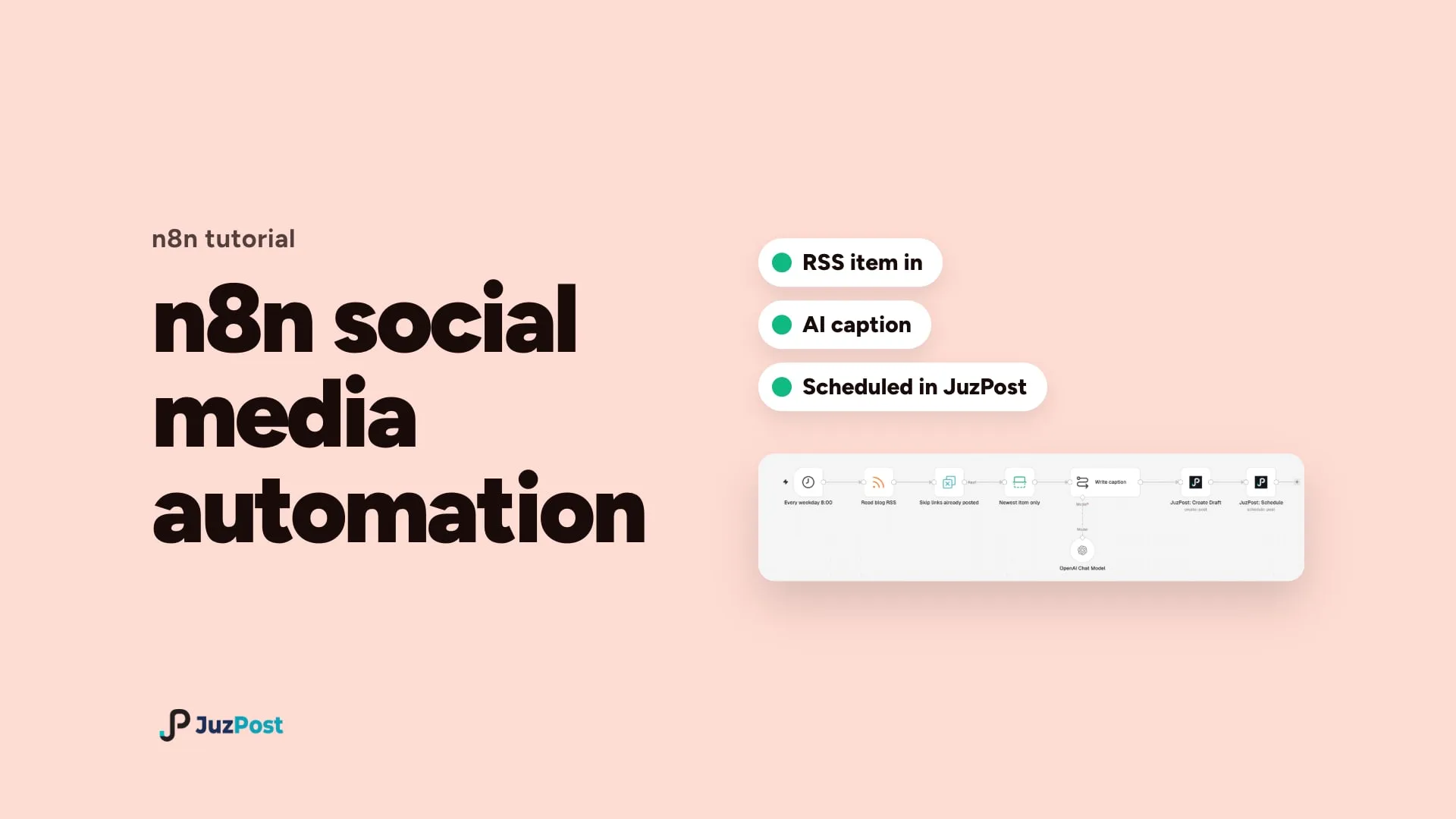
Seven nodes: a schedule, an RSS read, a de-duplicator, a limit, an AI caption, Create Draft, Schedule.
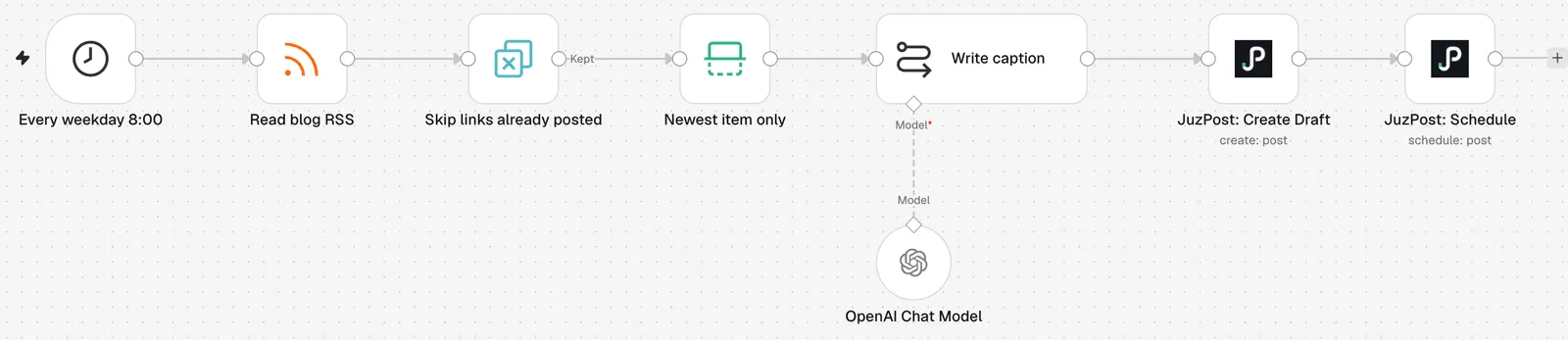
Trigger and feed
A Schedule Trigger fires at 8:00 on weekdays and an RSS Read node pulls your blog feed.
Skip links already posted
Use Remove Duplicates with the operation “Remove items processed in previous executions” and {{ $json.link }} as the value to compare. Without it, the workflow posts your newest article again every morning until you publish a new one. A Limit node set to 1 then keeps only the newest unseen item.
Write the caption
A Basic LLM Chain with any chat model. The prompt matters more than the model, because the caption has to fit the strictest platform you send it to:
Write a social post under 450 characters, link included, that makes
someone want to read this article. Plain text, at most two hashtags.
Title: {{ $json.title }}
Summary: {{ $json.contentSnippet }}
End with the link on its own line: {{ $json.link }}
450 is there because this workflow targets LinkedIn and Threads, and Threads stops at 500 characters. LinkedIn takes 3,000, X takes 280 on a standard account, Bluesky 300. JuzPost checks each platform’s caption cap when you schedule the post, not when you create the draft, so a 1,200-character caption creates a draft without complaint and then fails on Threads at the Schedule step. The Threads character counter is the quick way to test a prompt’s output by hand.
Create the draft
JuzPost node, Resource Post, Operation Create Draft:
- Content:
{{ $json.text }}(the chain’s output field) - Post Type: Text. Image, Video and Story need at least one media key before they can be scheduled.
- Additional Fields: Title, Description, Hashtags (comma-separated, no
#), Media Keys, Cover Image Key.
It returns { "id": "..." }. Content tops out at 2,200 characters here for every type except Blog (WordPress).
Schedule it
Second JuzPost node, Operation Schedule.
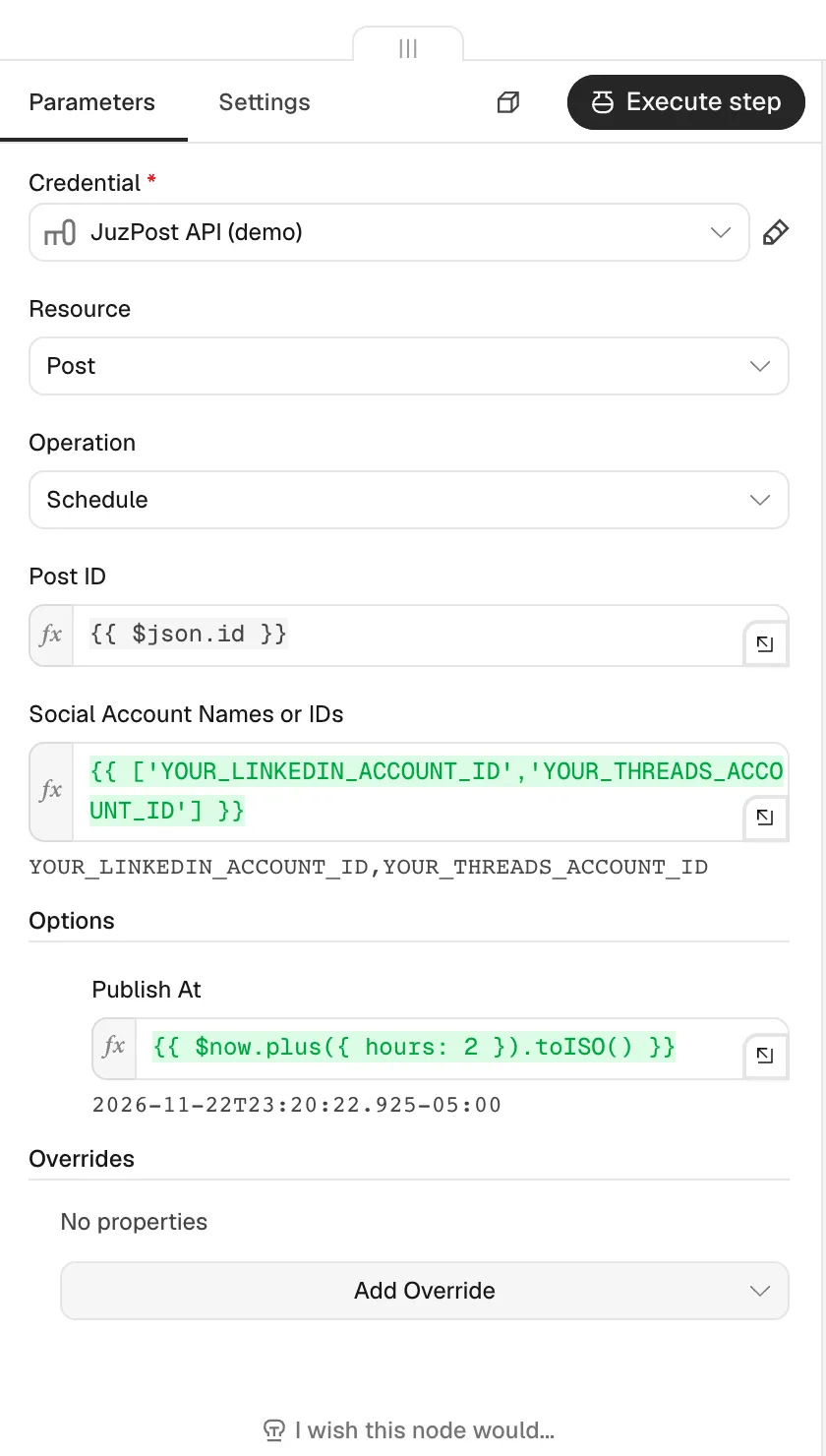
- Post ID:
{{ $json.id }} - Social Account Names or IDs: pick from the list, which the node loads from your workspace, or pass IDs by expression. One to ten accounts per call.
- Options, Publish At:
{{ $now.plus({ hours: 2 }).toISO() }}. Leave it empty and the post publishes immediately. - Overrides: a different title, description or hashtags for this send.
4. Rules the API enforces
Five API rules decide whether a run succeeds. The node shows the API’s own error message when one fails.
- 10 minutes of lead time, minimum. We started at five. It went to ten when Instagram support landed, because JuzPost builds the Instagram media container ten minutes before the publish time so that the publish call at the slot itself is fast. Any edit inside that window would change a post whose media was already staged, so nothing can be scheduled, retimed or edited closer than ten minutes out.
- 180 days ahead, maximum, on every paid plan.
- 30 drafts per hour per workspace through the API. This is a spam guard on creating drafts. Past it the API answers
rate_limiteduntil the hour rolls over. - Partial success is a normal result. When one of three accounts fails, Schedule returns
success: falsewith aresultsentry per account. Put an If node on{{ $json.success }}and readresultsinstead of treating the whole run as broken. - Upload size. Media, Upload takes a binary from any node (HTTP Request, Google Drive, Dropbox) and returns a
mediaKey. JuzPost accepts images up to 20 MB and videos up to 1 GB, then each platform applies its own lower cap: Instagram video 300 MB, X video 100 MB, Bluesky images 2 MB. The binary’s MIME type has to match the file.
5. Variant: a Google Sheet and Smart Schedule
If you write a week of posts at once, let JuzPost pick the times.
Swap the RSS half for a Google Sheets read, run Create Draft once per row, then add one Post, Smart Schedule node after an Aggregate so it runs once. Set:
- Posts Per Day: 1 to 20
- Target: a channel group, or a list of accounts (up to 10)
- Options: Dry Run, Post IDs (comma-separated; empty means every draft, oldest first), Posting Times (
09:00,17:30in the workspace timezone), Start Date (defaults to tomorrow)
Turn Dry Run on for the first execution. It returns the plan without creating any timers, so you see which draft lands on which slot before anything is committed.
6. JuzPost as an AI Agent tool
The node is marked usable as a tool, so an AI Agent can list accounts, draft and schedule from a chat.
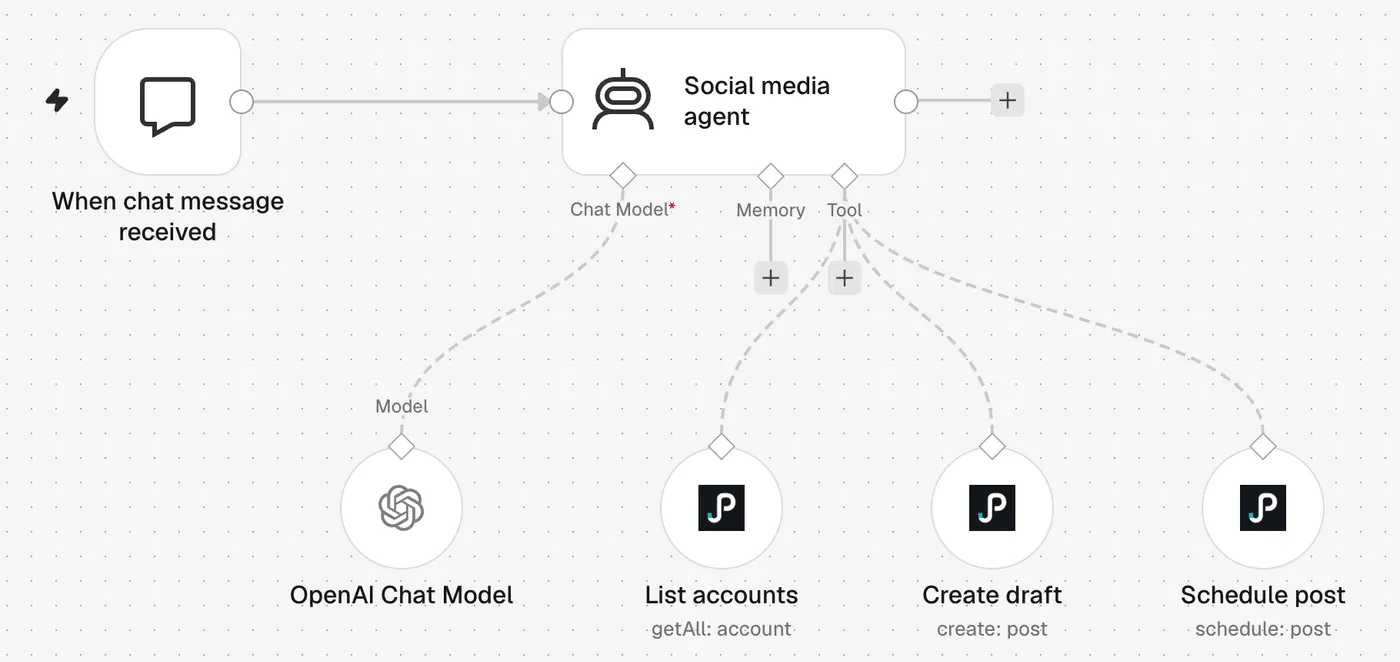
Attach three JuzPost tools to the agent’s Tool input:
- List accounts: Account, Get Many, Return All on.
- Create draft: Post, Create Draft, with Content set to
{{ $fromAI('content', 'The caption, up to 2200 characters', 'string') }}. - Schedule post: Post, Schedule, with Post ID, account IDs and Publish At each filled by
$fromAI().
Put the guard rail in the system message: create a draft, show it, and schedule only after the user says yes. A model that can call Schedule directly will eventually publish something you did not read.
On n8n 2.46.4 the JuzPost tool appeared with no extra configuration. On older versions, community reports say community nodes only show up as tools with N8N_COMMUNITY_PACKAGES_ALLOW_TOOL_USAGE=true set. If you would rather chat from Claude or ChatGPT than from n8n, the same actions are available over MCP.
7. Doing it yourself instead: what each platform asks for
For LinkedIn and X from your own account, the built-in nodes are enough, and you pay only X’s own API fees. Past that, the work moves from n8n into each platform’s developer portal.
- X bills per request since its move to pay-per-use. A post costs $0.015, and a post containing a URL costs $0.200, which is the exact case of an RSS-to-social workflow. Twenty link posts a month is $4 of API credit, before any testing.
- Instagram has no n8n node. You create a Meta app, run the OAuth flow, swap the token for a long-lived one that lasts 60 days, then publish in two calls: create a media container, wait for it to finish processing, publish it. Standard access covers accounts your app owns, which is fine for your own brand.
- Threads has the same shape. Without advanced access to
threads_content_publish, Meta’s docs restrict posting to your own account and the app’s testers. That is enough for one person and a dead end for an agency. - TikTok is the hard one. Until TikTok audits your app, its docs restrict posts from that app to private viewing. Your scheduled video publishes and nobody can see it. JuzPost passed that audit in October 2026.
- Token refresh is a workflow of its own. Every platform above expires tokens on its own clock, and an expired token shows up as a failed 8:00 run, not as a warning the week before.
None of this is impossible, and if you only post to your own accounts on two platforms, DIY is the cheaper answer. The trade is $19 a month against maintaining one OAuth app, one token refresh and one upload flow per platform.
8. Catch failures with the trigger
Add a second workflow: JuzPost Trigger set to Failed, into Slack or email.
It polls JuzPost and emits each post once when it reaches that status. Follow it with Post, Get on the post’s id to fetch the per-account delivery state, so the alert can say which platform refused it. Set it to Posted instead and you get a feed you can write to a sheet for reporting.
9. Import the workflow
This is the exact workflow from the screenshot, exported from n8n with credentials removed. Copy it, press Ctrl+V (or Cmd+V) on an empty canvas, then pick your credentials and replace the two placeholder account IDs.
{
  "name": "RSS to AI caption to JuzPost",
  "nodes": [
    {"name": "Every weekday 8:00", "type": "n8n-nodes-base.scheduleTrigger", "typeVersion": 1.2, "position": [0, 0], "parameters": {"rule": {"interval": [{"field": "weeks", "triggerAtDay": [1, 2, 3, 4, 5], "triggerAtHour": 8}]}}},
    {"name": "Read blog RSS", "type": "n8n-nodes-base.rssFeedRead", "typeVersion": 1.2, "position": [220, 0], "parameters": {"url": "https://www.juzpost.com/blog/rss.xml", "options": {}}},
    {"name": "Skip links already posted", "type": "n8n-nodes-base.removeDuplicates", "typeVersion": 2, "position": [440, 0], "parameters": {"operation": "removeItemsSeenInPreviousExecutions", "dedupeValue": "={{ $json.link }}", "options": {}}},
    {"name": "Newest item only", "type": "n8n-nodes-base.limit", "typeVersion": 1, "position": [660, 0], "parameters": {"maxItems": 1}},
    {"name": "Write caption", "type": "@n8n/n8n-nodes-langchain.chainLlm", "typeVersion": 1.7, "position": [880, 0], "parameters": {"promptType": "define", "text": "=Write a social post under 450 characters, link included, that makes someone want to read this article. Plain text, at most two hashtags.\nTitle: {{ $json.title }}\nSummary: {{ $json.contentSnippet }}\nEnd with the link on its own line: {{ $json.link }}"}},
    {"name": "OpenAI Chat Model", "type": "@n8n/n8n-nodes-langchain.lmChatOpenAi", "typeVersion": 1.2, "position": [880, 220], "parameters": {"model": {"__rl": true, "mode": "list", "value": "gpt-4.1-mini"}, "options": {}}},
    {"name": "JuzPost: Create Draft", "type": "n8n-nodes-juzpost.juzPost", "typeVersion": 1, "position": [1220, 0], "parameters": {"resource": "post", "operation": "create", "content": "={{ $json.text }}", "type": "text", "additionalFields": {}}},
    {"name": "JuzPost: Schedule", "type": "n8n-nodes-juzpost.juzPost", "typeVersion": 1, "position": [1440, 0], "parameters": {"resource": "post", "operation": "schedule", "postId": "={{ $json.id }}", "socialAccountIds": "={{ ['YOUR_LINKEDIN_ACCOUNT_ID','YOUR_THREADS_ACCOUNT_ID'] }}", "scheduleOptions": {"publishAt": "={{ $now.plus({ hours: 2 }).toISO() }}"}}}
  ],
  "connections": {
    "Every weekday 8:00": {"main":[[{"node":"Read blog RSS","type":"main","index":0}]]},
    "Read blog RSS": {"main":[[{"node":"Skip links already posted","type":"main","index":0}]]},
    "Skip links already posted": {"main":[[{"node":"Newest item only","type":"main","index":0}]]},
    "Newest item only": {"main":[[{"node":"Write caption","type":"main","index":0}]]},
    "OpenAI Chat Model": {"ai_languageModel":[[{"node":"Write caption","type":"ai_languageModel","index":0}]]},
    "Write caption": {"main":[[{"node":"JuzPost: Create Draft","type":"main","index":0}]]},
    "JuzPost: Create Draft": {"main":[[{"node":"JuzPost: Schedule","type":"main","index":0}]]}
  }
}
Run it once by hand with Publish At two hours out, check the post in JuzPost’s calendar, and only then activate the schedule.
Questions people ask
Can n8n post to Instagram?
Not with a built-in node. n8n 2.46.4 has no Instagram node, so you either call the Instagram Graph API with HTTP Request nodes and your own Meta app, or use a community node such as n8n-nodes-juzpost that publishes through a scheduler.
How do I schedule social media posts in n8n?
Create the post as a draft, then call a schedule operation with a publish time. With the JuzPost node that is Post, Create Draft followed by Post, Schedule with Publish At at least 10 minutes and at most 180 days ahead. Smart Schedule spreads many drafts over preset times instead.
Does the JuzPost node work on n8n Cloud?
Not yet. n8n Cloud only runs verified community nodes, and the JuzPost node's verification review is still pending. It installs today on self-hosted n8n from Settings, Community nodes.
Is the JuzPost API free?
No. API keys, the n8n node and the MCP connector start on the Solo plan at $19 a month, with a 7-day trial that needs a card. The Free plan schedules from the JuzPost app only.
Can n8n post to TikTok?
There is no built-in TikTok node. If you build your own TikTok app, TikTok restricts its posts to private viewing until the app passes TikTok's audit. A scheduler that has passed the audit, like JuzPost, can publish publicly.
Why did my scheduled post fail on Threads but not LinkedIn?
Most likely the caption. Threads caps a post at 500 characters and LinkedIn at 3,000, and JuzPost checks each platform's cap when the post is scheduled. Keep AI captions under the strictest limit of the platforms you target.
Next
Install the node, generate a key on the API tab of the AI agents page, and import the workflow above with your own feed URL. If you are sending one caption to several platforms, what changes when one draft goes to five platforms covers the limits that break first, and native scheduling versus a tool covers who holds the timer once the post leaves n8n.
See JuzPost plans with API access